This vimrc is forked from vgod's vimrc, below is his original README
I keep it since I did not make a lot of change from his vimrc
Author: Tsung-Hsiang (Sean) Chang vgod@vgod.tw
Fork me on GITHUB https://github.com/vgod/vimrc.
Use curl (for Mac OS X):
curl -o - https://raw.github.com/vgod/vimrc/master/auto-install.sh | sh
or wget (for most UNIX platforms):
wget -O - https://raw.github.com/vgod/vimrc/master/auto-install.sh | sh
-
Check out from github
git clone git://github.com/vgod/vimrc.git ~/.vim cd ~/.vim git submodule update --init -
Install ~/.vimrc and ~/.gvimrc
./install-vimrc.sh -
(Optional, if you want Command-T) Compile the Command-T plugin
 cd .vim/bundle/command-t/ruby/command-t
 ruby extconf.rb
 make
-
Check out from github
cd C:\Program Files\Vim (or your installed path to Vim) rmdir /s vimfiles (This deletes your old vim configurations. If you want to keep it, use move instead of rmdir.) git clone git://github.com/vgod/vimrc.git vimfiles git submodule update --init -
Install vimrc. Add the following line at the end of C:\Program Files\Vim\vimrc.
source $VIM/vimfiles/vimrc
All plugins (except vim-latex) were checked out as git submodules,
which can be upgraded with git pull. For example, to upgrade Command-T
 cd ~/.vim/bundle/command-t
 git pull
To install a new plugin as a git submoudle, type the following commands.
 cd ~/.vim
 git submodule add [GIT-REPOSITORY-URL] bundle/[PLUGIN-NAME]
see the "USEFUL SHORTCUTS" section in vimrc to learn my shortcuts.
-
Pathogen: Pathogen let us install a plugin as a bundle in ~/.vim/bundle seprately.
-
Nerd Tree: A tree explorer plugin for navigating the filesystem.
Useful commands:
:Bookmark [name]- bookmark any directory as name
:NERDTree [name]- open the bookmark [name] in Nerd Tree -
AutoClose: Inserts matching bracket, paren, brace or quote.
-
vim-surround: deal with pairs of surroundings.
-
matchit: extended % matching for HTML, LaTeX, and many other languages.
-
xmledit: XML/HTML tags will be completed automatically.
-
Command-T: open and navigate between files with
cmd-t. -
SuperTab: Do all your insert-mode completion with Tab.
-
snipMate: TextMate-style snippets for Vim
:help snipMateto see more info. -
YankRing: Maintains a history of previous yanks, changes and deletes
:help yankringto see more info. -
VisIncr: Produce increasing/decreasing columns of numbers, dates, or daynames.
-
Cute Error Marker: showing error and warning icons on line.
MacVim users need to enable "Use experimental renderer" to see graphical icons.
-
vim-latex: Latex support.
-
OmniCppComplete: C/C++ omni-completion with ctags database.
-
JavaComplete: Java Omni-completion.
-
EasyMotion: An easy way to jump to a word.
Useful commands:
,,wforward EasyMotion
,,bbackward EasyMotion -
TagBar: browsing the tags of source files ordered by classes.
Useful commands:
F7toggles the TagBar -
Indent Motion: Vim motions to the start and end of the current indentation-delimited block
Useful commands:
,]move to the end of the current indentation-delimited block (very useful in Python and CoffeeScript),[move to the beginning of the current indentation-delimited block (very useful in Python and CoffeeScript) -
Zen Coding: expanding abbreviation like zen-coding.
Useful commands:
<ctrl-y>,expand zen-coding abbreviation. -
ack.vim: run ack (a better grep) from vim, and shows the results in a split window.
:Ack [options] {pattern} [{directory}] -
Git Gutter: shows a git diff in the 'gutter' (sign column). It shows whether each line has been added, modified, and where lines have been removed.
- Latex: Read
:help latex-suite.txt - Restructured Text:
ctrl-u 1~5inserts Part/Chapter/Section headers - HTML, Javascript, CoffeeScript, Python, CSS, C, C++, Java: use
TABto do omni-completion. - HTML/XML: End tags are automatically completed after typing a begin tag. (Typing > twice pushes the end tag to a new line.)
I've compiled and plotted a Vim Cheat Sheet for beginners. Welcome to download and learn Vim with it.
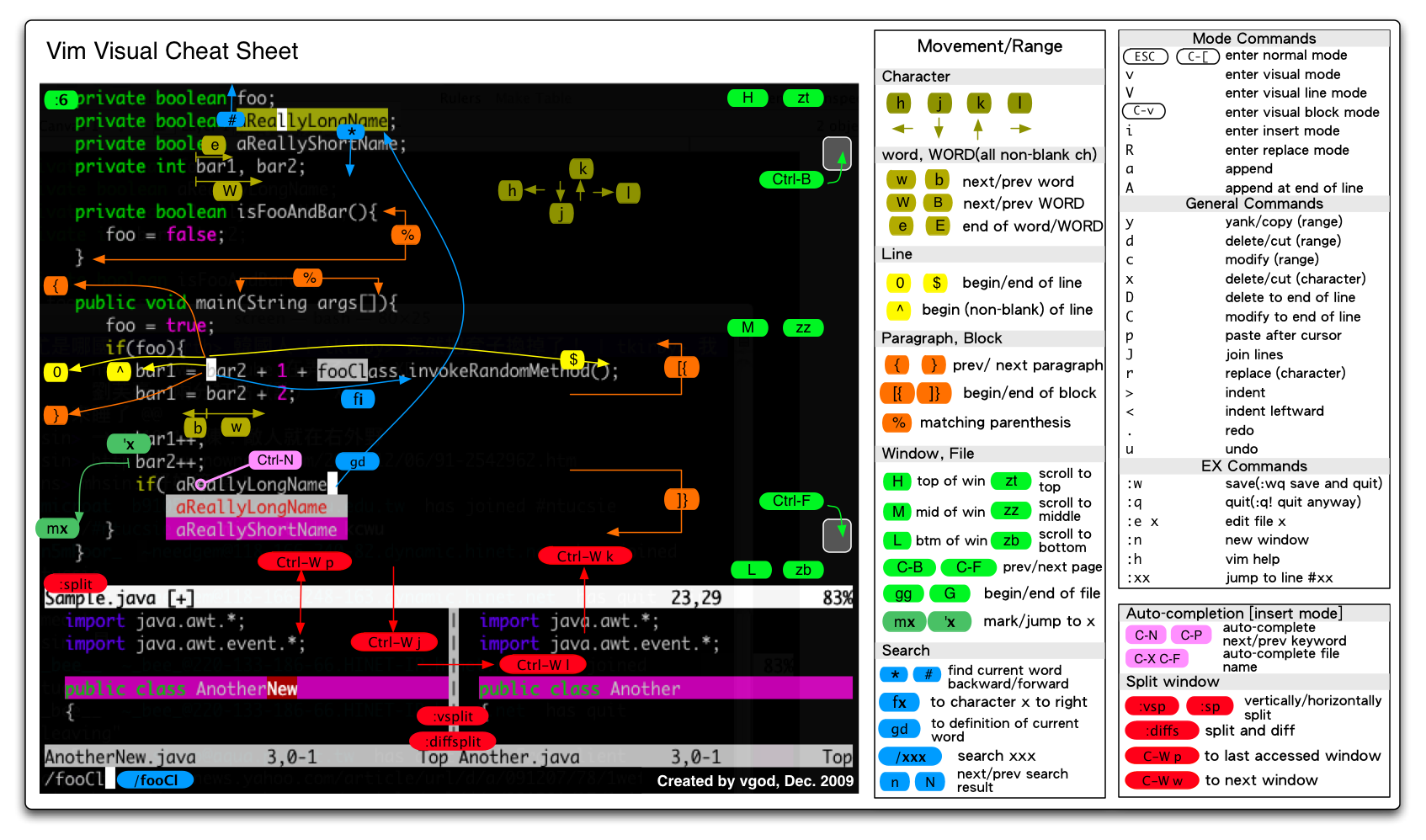
- Vim Visual Cheat Sheet (PNG)
- Vim Visual Cheat Sheet (PDF)
- Vim入門圖解 Chinese Ver. (PNG)
- Vim入門圖解 Chinese Ver. (PDF)
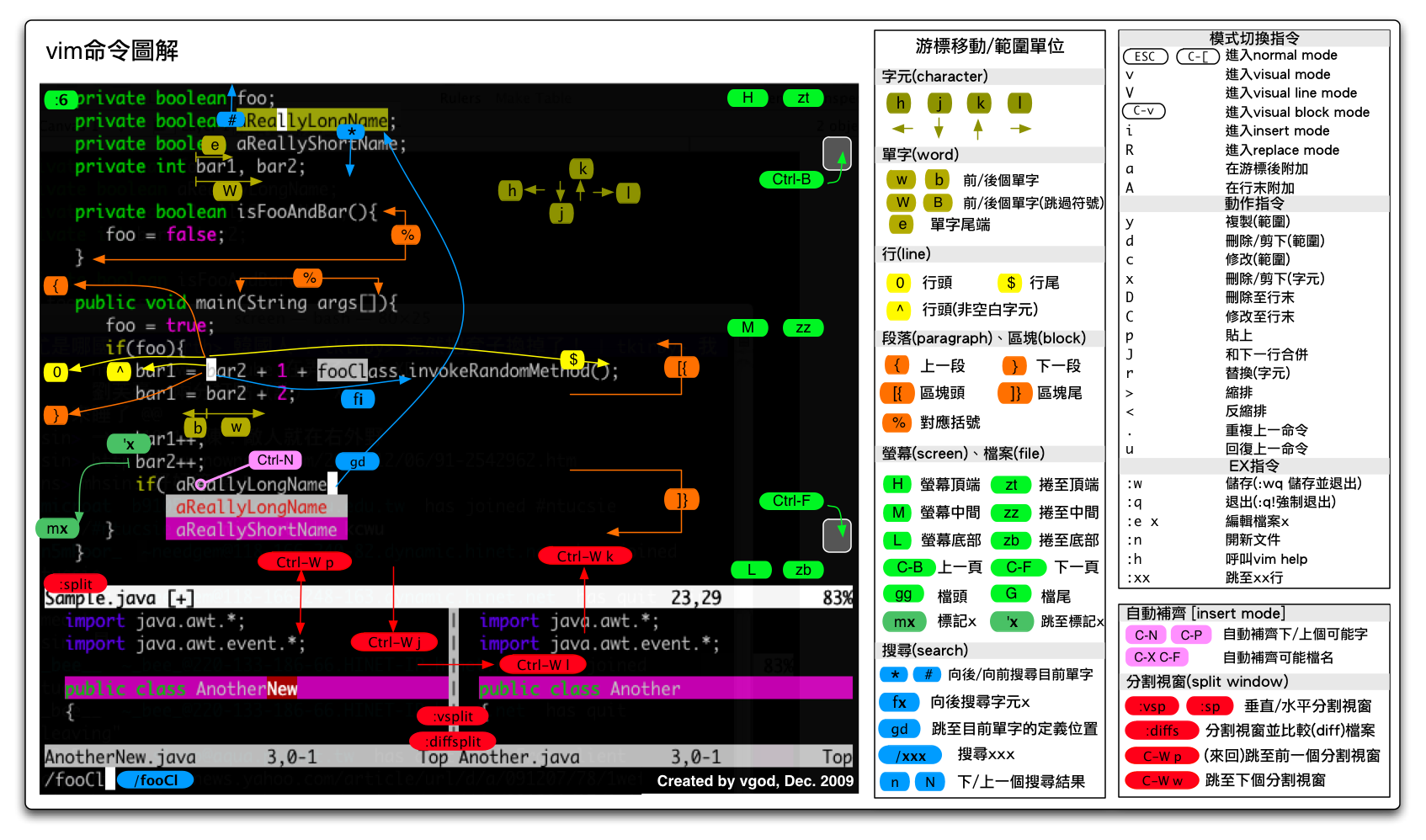
These Vim Visual Cheat Sheets are released under Creative Commons Attribution-ShareAlike 3.0 Unported License.
This vimrc project is released under Creative Commons Attribution-ShareAlike 3.0 Unported License.